Mac help
How to Open PinBoard on Mac
The first time you open PinBoard, your Mac may say it couldn't check the app and won't open it. That's normal for apps from small, independent makers. Here's how to open it, once, in about a minute.
The messages you might see
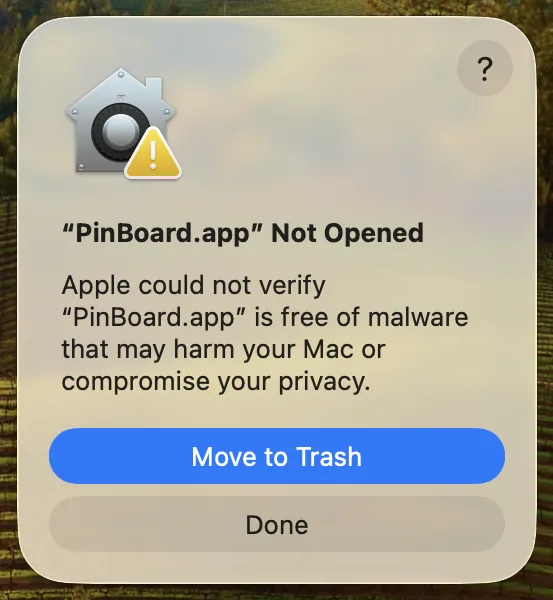
- "PinBoard" Not Opened. Apple could not verify "PinBoard" is free of malware that may harm your Mac or compromise your privacy. This is what macOS Sequoia and Tahoe show.
- "PinBoard" can't be opened because Apple cannot check it for malicious software. The same thing, as macOS Sonoma and Ventura word it.
Neither message means something is wrong with PinBoard. It means PinBoard hasn't been through Apple's paid signing program yet, so your Mac can't check who made it. Many apps from independent makers start out this way.
How to open PinBoard on macOS Sequoia and Tahoe
When the message appears, click Done. Don't click Move to Trash.
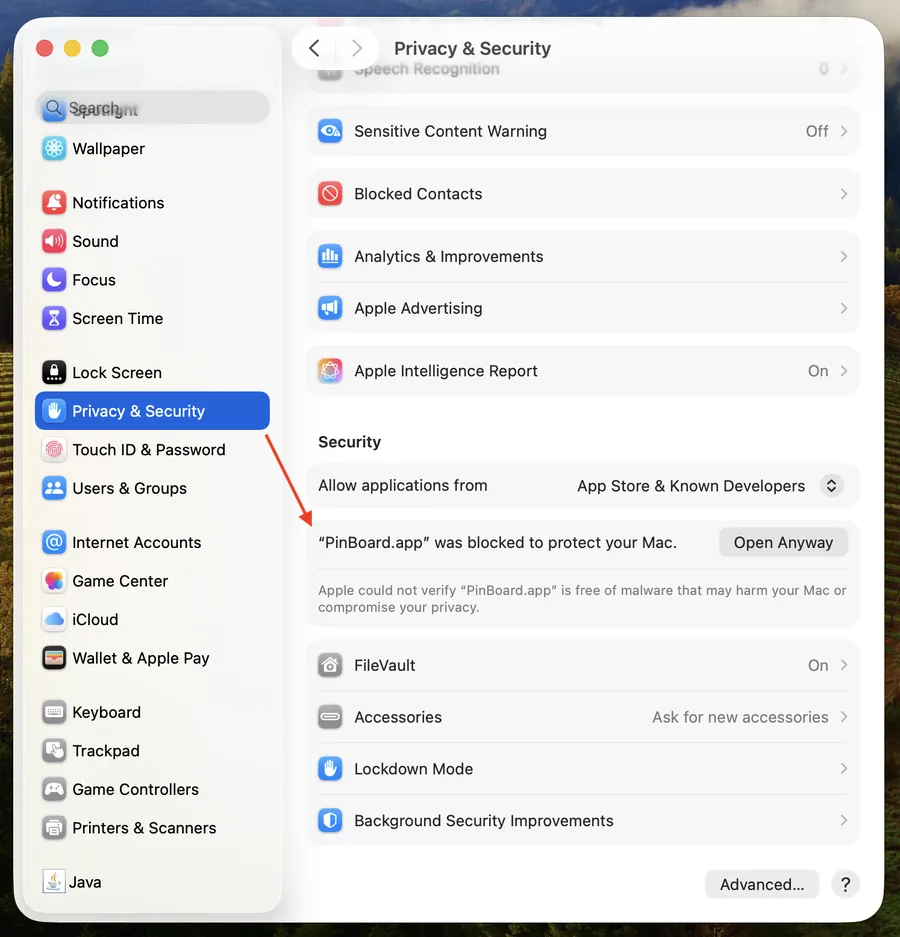
Open System Settings from the Apple menu, click Privacy & Security, and scroll down to the Security section. You'll see a line saying "PinBoard" was blocked to protect your Mac.
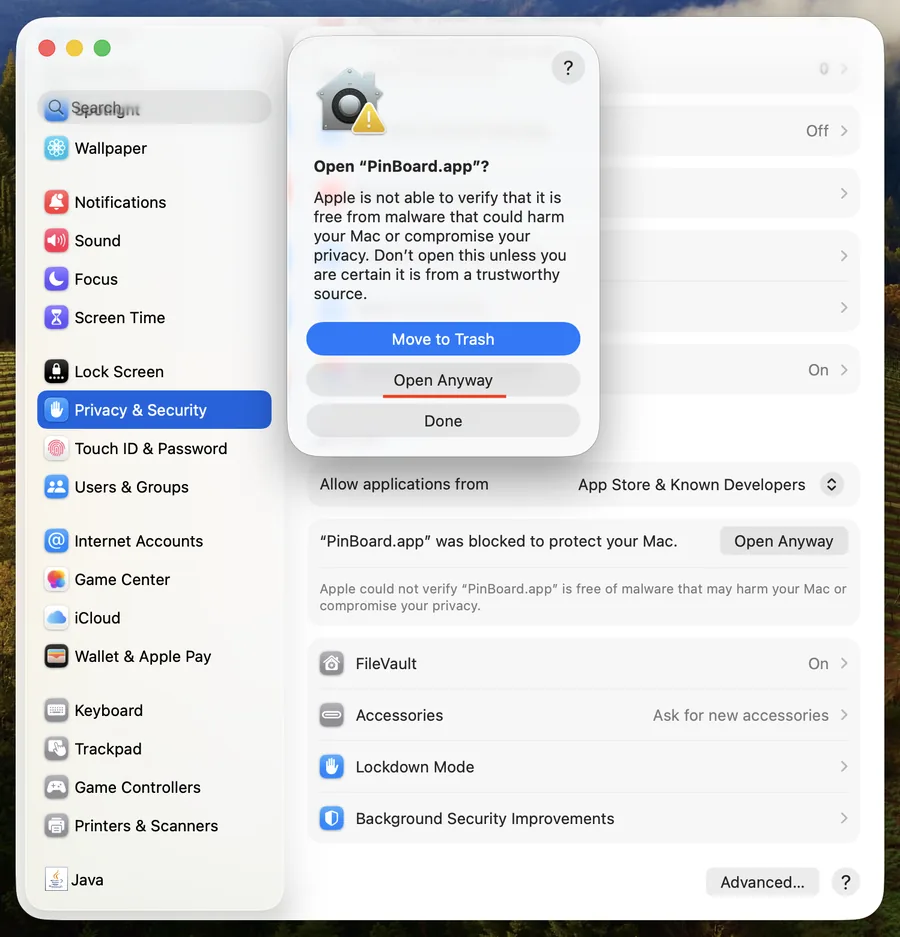
Click Open Anyway, then Open Anyway again in the box that pops up, and confirm with your password or Touch ID. PinBoard opens, and from then on it opens normally.
On macOS Sonoma or Ventura
There's a quicker way on these versions. In Finder, open Applications, hold the Control key and click PinBoard (or right-click it), choose Open, then click Open again. The Privacy & Security route above works too. Apple removed the Control-click shortcut in Sequoia, which is why it doesn't work there.
Is it safe to open?
- Only download PinBoard from the official link, the download page on this site, never from a copy someone sends you.
- PinBoard runs on your own Mac. It has no tracking and no analytics, and your downloads go straight from Pinterest to your computer.
- Your Pinterest password goes to Pinterest. Signing in opens Pinterest's own sign-in page. PinBoard never sees your password.
Still won't open?
- Check you have the right version. Macs with Apple Silicon (M1 and newer) need the Apple chip download, older Intel Macs need the Intel one, both on the download page. In the Apple menu, About This Mac shows which you have.
- Check your macOS version. PinBoard needs macOS 13 Ventura or newer. On macOS 11 or 12, use PinBoard v1.2.0 from the releases page.
- Move it to Applications first. Drag PinBoard from the disk image into Applications, then open it from there.
- Still stuck? Write to support@getpinboard.com with your Mac model and the exact message, and we'll help.
After a new version comes out, your Mac may ask once more the first time you open the update. The same steps work. More on setting up PinBoard in the Pinterest downloader for Mac guide.
Frequently Asked Questions
Ready when you are
Download PinBoard for your Mac, open it once with Open Anyway, and start saving boards.
Download PinBoard for Mac