Windows help
How to Install PinBoard on Windows
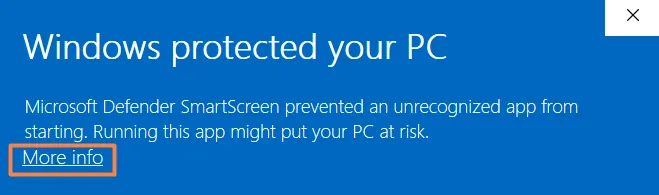
When you open the PinBoard installer, Windows may show a blue screen saying it protected your PC. That's Windows being careful with an app it hasn't seen much of yet. Here's how to get past it, in two clicks.
Why Windows shows this screen
The blue Windows protected your PC screen comes from Microsoft Defender SmartScreen. It checks how many people have downloaded an app and whether it carries a paid publisher certificate. PinBoard is made by an independent developer and doesn't have that certificate yet, so SmartScreen says it doesn't recognize it. It doesn't mean anything harmful was found.
How to run the PinBoard installer
On the blue screen, click More info, the small link under the message.
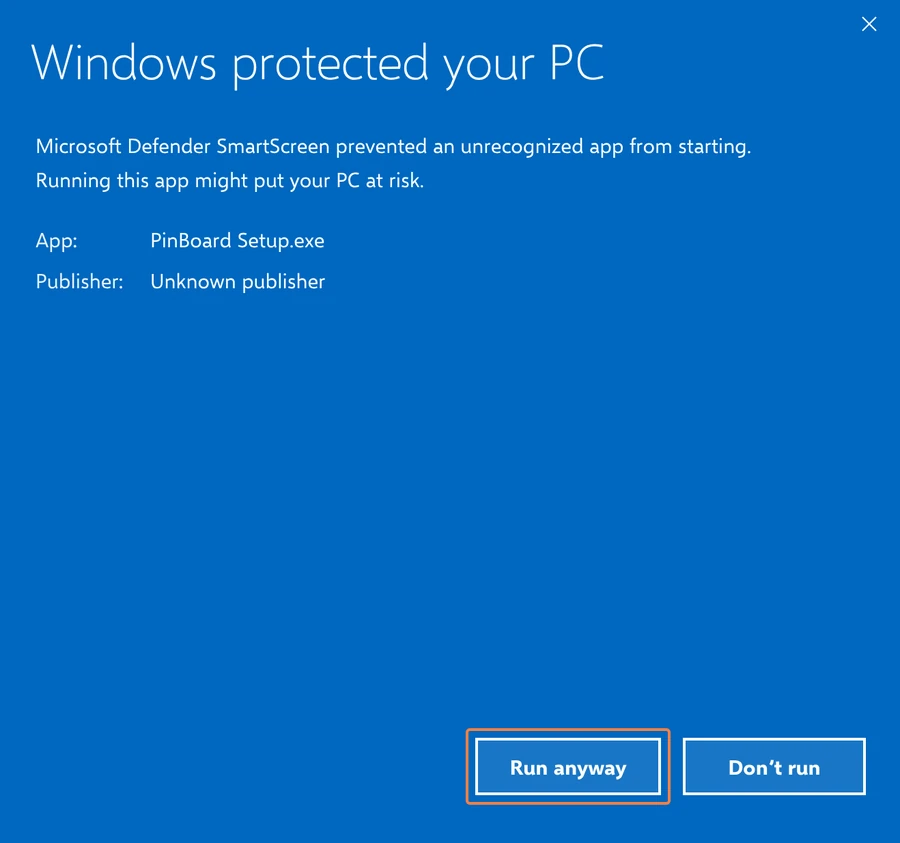
A Run anyway button appears, with PinBoard named as the app. Click it and the installer starts.
Follow the installer. Afterwards, PinBoard is in the Start menu, and it opens normally from then on.
If your browser warns you first
Some browsers warn about downloads they don't see often, before the file even reaches your Downloads folder.
- Microsoft Edge: in the downloads list, point at the PinBoard download, click the three dots, choose Keep, then Show more and Keep anyway.
- Chrome: in the downloads list, choose Keep next to the PinBoard download.
If your antivirus moved it
Antivirus apps sometimes treat new, uncertified apps with suspicion. If the installer disappeared from your Downloads folder, look in your antivirus app's quarantine or protection history, choose to restore or allow the PinBoard installer, and run it again.
Is it safe to run?
- Only download PinBoard from the official link, the download page on this site, never from a copy someone sends you.
- PinBoard runs on your own PC. It has no tracking and no analytics, and your downloads go straight from Pinterest to your computer.
- Your Pinterest password goes to Pinterest. Signing in opens Pinterest's own sign-in page. PinBoard never sees your password.
After it's installed
Paste a Pinterest board link, click Load Board and download. With Pro, PinBoard can also sit in the system tray and back up your boards daily or weekly. The Pinterest downloader for Windows guide walks through the rest. When a new version comes out, Windows may show the blue screen once more for the new installer. The same two clicks work.
Frequently Asked Questions
Ready when you are
Download PinBoard for Windows, click More info and Run anyway once, and start saving boards.
Download PinBoard for Windows