Step-by-step guide
How to Download a Pinterest Board (All Pins at Once)
Pinterest lets you save one image at a time, but it has no button to download a whole board. To download every pin from a board at once, use PinBoard, a desktop app for Mac, Windows and Linux. Paste the board's link, click Load Board, then click Download. The whole board lands in a folder on your computer, at full size.
 Watch the video · 2:32
Can you download a whole board on Pinterest itself?
No. On Pinterest you can open a pin and choose Download image, but only for that one pin. A board with 300 pins means 300 downloads. Pinterest's own data download doesn't help either: it holds information about your pins, like board names and links, not the image files. Here's what's in Pinterest's data export.
PinBoard does the whole board in one go. It's an app you install on your computer, not a website or a browser extension, so the files go straight from Pinterest into a folder you can open, sort and keep.
How to download a Pinterest board, step by step
Five steps. You only do the first two once.
Get the free download from the download page. It shows which file is the right one for your Mac, Windows PC or Linux computer.
PinBoard is made by an independent developer and isn't signed by Apple or Microsoft yet, so your computer checks with you before opening it, just once. On a Mac, click Done on the warning, then go to System Settings, Privacy & Security and click Open Anyway (Mac steps with pictures). On Windows, click More info, then Run anyway (Windows steps, or watch the video below).
Open the board on Pinterest in your browser and copy the address from the address bar. Any link works: the full address, country sites like de.pinterest.com, short pin.it links, or just username/board-name.
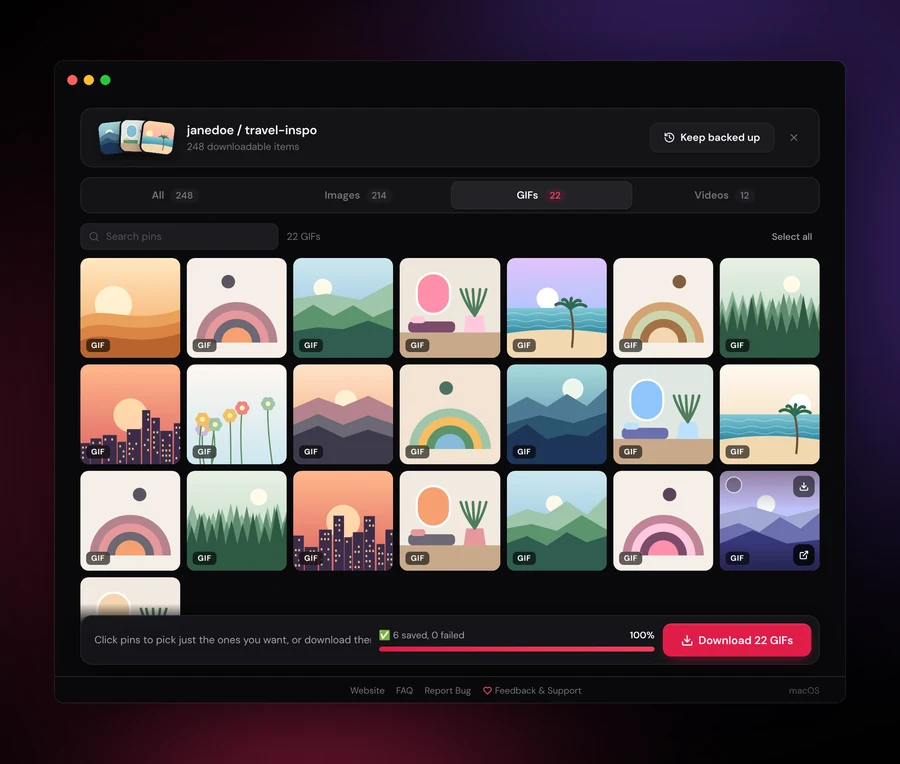
Paste the link into PinBoard, or drag it onto the window, and click Load Board. PinBoard goes through the whole board and shows how many images, GIFs and videos it found.
Click Download. PinBoard saves the board into its own folder on your computer. With PinBoard Pro, the All tab saves every image, GIF and video at once. The free version saves the first 25 images, so you can see how it works on your own board first.
Installing on Windows? Watch this first
The first time you open the installer, Windows shows a blue screen saying it protected your PC. This one-minute video shows the whole install, including the two clicks that get you past that screen.
 Watch the video · 1:05
On a Mac, the opening PinBoard on Mac guide shows the Open Anyway steps with screenshots.
All pins at once, or only some
- Everything: the All tab (Pro) saves every image, GIF and video in one click.
- One kind: pick Images, GIFs or Videos to save only those. Videos come out as MP4 files with sound (more about videos).
- Just some pins: click the pins you want in the grid, then Download Selected (picking pins).
- One section: paste a section's link to save only that section, or turn on Section Folders (Pro) to save the whole board with every section in its own folder (board sections).
- Every board on a profile: paste a profile link instead of a board link (whole profiles).
What you get on your computer
- Full-size images, at the highest resolution Pinterest has, not the small copies the feed shows.
- GIFs that still move, saved as .gif files (Pro).
- Videos as MP4 files, with sound (Pro).
- One folder per board, named after the board, inside Downloads/PinBoard unless you pick another place in Settings.
- No doubles. Download the same board again later and PinBoard only saves the new pins.
Free or Pro?
The free version saves the first 25 images of any public board, so you can try it on your own board before you pay anything. PinBoard Pro is a one-time $19, with no subscription. It saves the whole board, plus GIFs, videos, private boards, section folders and automatic backups, on up to 3 computers. If Pro can't download your board, you get your money back within 14 days. See pricing.
Private and secret boards
Your own private boards only load when you're signed in. With Pro, click Sign in to Pinterest in the app, sign in on Pinterest's own page, then paste the private board's link. Your password goes to Pinterest, never to PinBoard. The private boards guide has the details.
If a big board stops loading
Pinterest limits how fast big boards can load. When that happens, PinBoard waits and carries on by itself. If a board still stops early, open Settings, set Speed to Slow and load the board again.
Seeing fewer pins than Pinterest shows? Pinterest's count still includes pins that were deleted or hidden, and nobody can download those anymore. PinBoard saves every pin that's still there and tells you how many are missing.
Frequently Asked Questions
Download your first board
Get PinBoard, paste a board link, click Load Board, then Download.
Download PinBoard