Bulk Download
How to Download Multiple Images from Pinterest at Once
Pinterest's Download image button saves one pin at a time. On a board with 200 pins, that's 200 clicks. Here's how to save many Pinterest images in one go: the whole board, or just the pins you pick.
Why Pinterest makes this hard
Pinterest is made for saving pins to boards, not to your computer. Its menu has a Download image option, but only for one pin at a time, and there's no way to select several pins and save them together. Right-clicking an image in your browser often saves a smaller copy too (here's why Pinterest images look small).
PinBoard is a desktop app that loads a whole board at once and shows every pin in a grid, so you can save as many as you like in one click.
How to download many Pinterest images at once
Open the board on Pinterest and copy the address from your browser. A section link or a profile link works too.
Open PinBoard, paste the link and click Load Board. Every pin shows up in a grid, split into tabs for Images, GIFs and Videos.
Click the pins you want. Each one gets a check mark. Then click Download Selected. Want everything? Skip the picking and click Download.
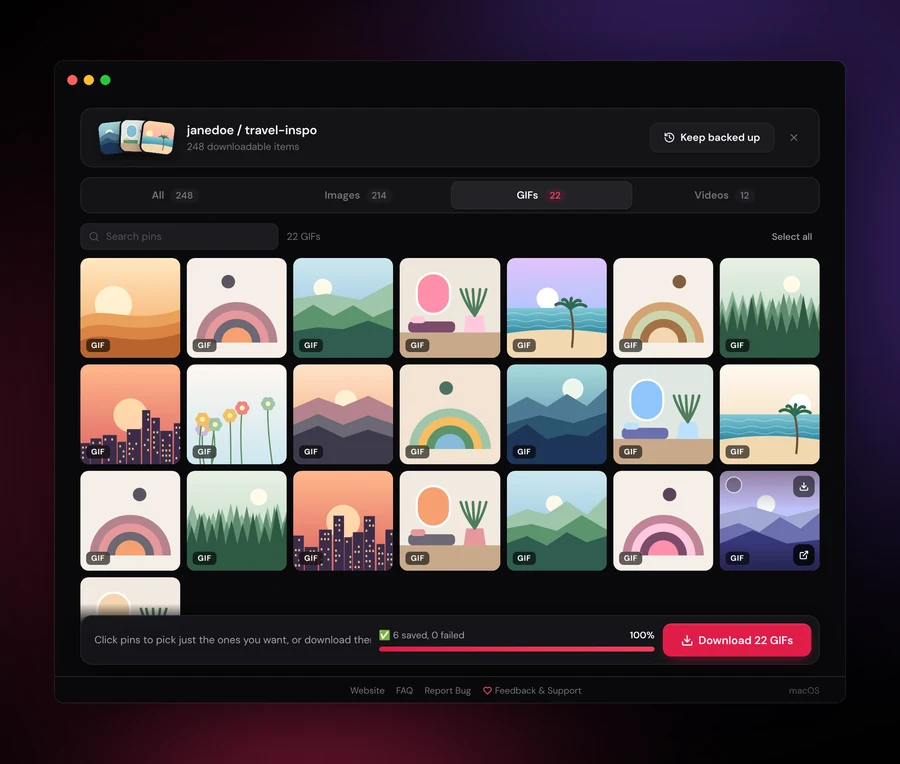
Picking pins faster
- Select a range: click one pin, then hold Shift and click another. Everything in between is selected too.
- Select everything: press Cmd+A on Mac or Ctrl+A on Windows and Linux. Press Esc to clear the selection.
- Search: type a word in the search box to show only pins whose description mentions it, then select those.
- Just one pin: hover a pin and click its small download button.
Where the images go
Into a folder named after the board, inside the PinBoard folder in your Downloads. You can pick a different folder in Settings. Every image is saved at the highest resolution Pinterest has, in its original format (JPG, PNG or GIF), with the pin's description in the file name (when it has one) so it's easy to find later.
Download the same board again later and PinBoard only saves the pins you don't have yet.
Free vs Pro
The free version saves the first 25 images of any public board, so a small selection often fits. PinBoard Pro is a one-time $19 and unlocks every pin on the board, plus GIFs, videos and private boards.
Frequently Asked Questions
Stop saving pins one at a time
Load a board, pick the pins you want, and download them all at once.
Download PinBoard for Free